- WordPress runs about 42% of all websites and close to 60% of the sites that use a known CMS. Marketers keep picking it for good reasons.
- Search control, easy editing and a huge tool ecosystem are the big three. Speed stops being a fair complaint when the build is done with care.
- This site has an animated hero and still scores 94 on mobile and 99 on desktop in PageSpeed Insights.
Every few months somebody tells me WordPress is dead. Then I look at who actually hires me: marketers, agencies, clinic owners, mortgage brokers, tile contractors. They all want a site they can edit on a Tuesday afternoon without calling a developer, and they all want it to show up on Google. After more than 20 years of building websites, WordPress is still the tool that does both best.
According to W3Techs, WordPress powers around 42% of all websites. Among sites that run on a known CMS, it holds close to 60%. Shopify and Wix are next on that list, and neither is close. Popularity alone is a weak reason to pick a tool, though, so here is what it actually does for a marketer.
Why marketers keep choosing WordPress
A marketing site is never really finished. You add a landing page for a campaign, rewrite a headline after a slow week, plug in a form, a pixel, a booking tool. The platform has to keep up with that pace without a ticket queue.
-
- You own it. Your content, your hosting, your data. Moving to another host takes an afternoon. Try that with a hosted site builder.
-
- Your team can edit it. The block editor is simple enough for a copywriter and flexible enough for a designer.
-
- Everything plugs in. Google Analytics, Tag Manager, Meta pixel, HubSpot, Mailchimp, Zapier, payment gateways. If a tool exists, someone has already built the connector.
-
- No ceiling. Start with five pages. Add a blog, a shop or a booking system later, on the same site.
Where WordPress really earns its place: SEO
Search is still the cheapest traffic most small businesses will ever get. WordPress was built with that in mind. You get clean permalinks, plain HTML that crawlers read without running a pile of JavaScript, and control over the parts that matter. On almost every build I set up:
-
- Page titles and meta descriptions you can change on every page.
-
- Structured data (schema) so Google understands who you are, what you sell and where you work.
-
- XML sitemaps, canonical tags and simple redirects for when a URL changes.
-
- A sensible heading structure and internal links between related pages.
-
- Pages that load fast and cache well. More on that next.
None of this is magic, and plenty of platforms let you edit a title tag. Fewer let you fix redirects, schema and site structure without hitting a wall or being asked to upgrade your plan.
The speed objection, with real numbers
The usual complaint is that WordPress is slow. Sometimes it is. A site with nineteen plugins, a heavy page builder and a 4 MB hero image will crawl on any platform. That is a build problem, and the platform gets blamed for it.
So I ran my own homepage through Google PageSpeed Insights. This is the real page, with the animated dotted globe, the floating ad mockups and the scroll effects. Not a stripped-down test page.
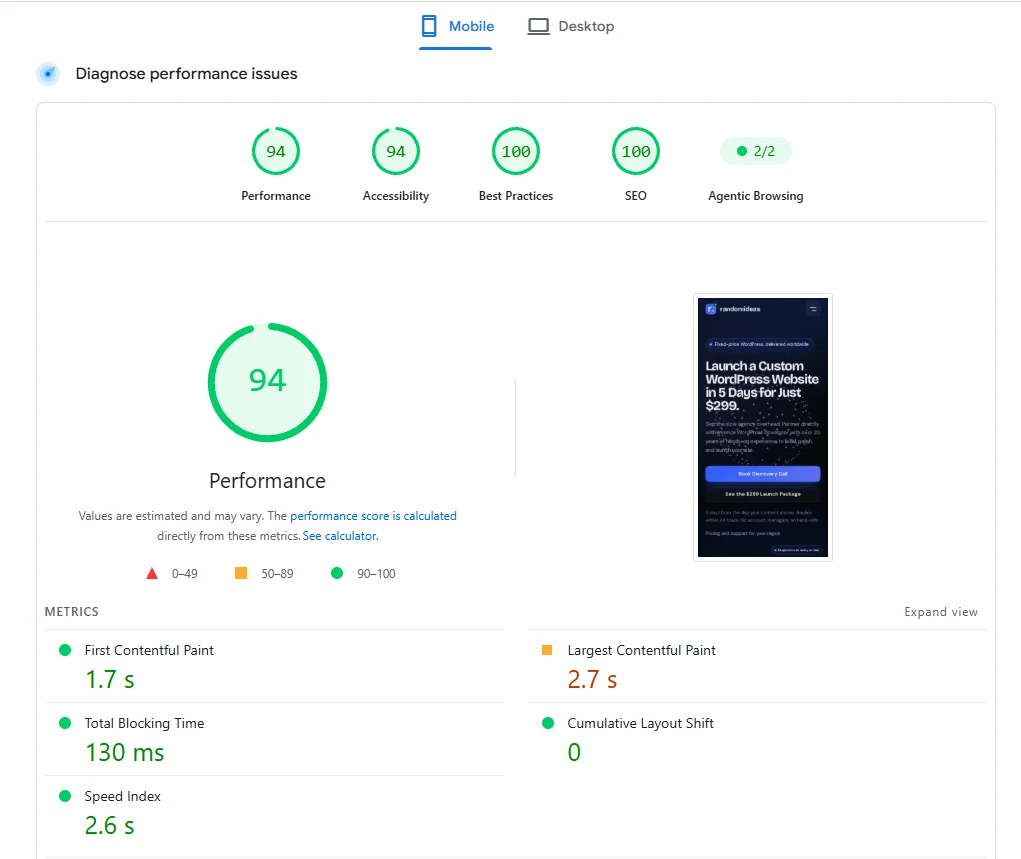
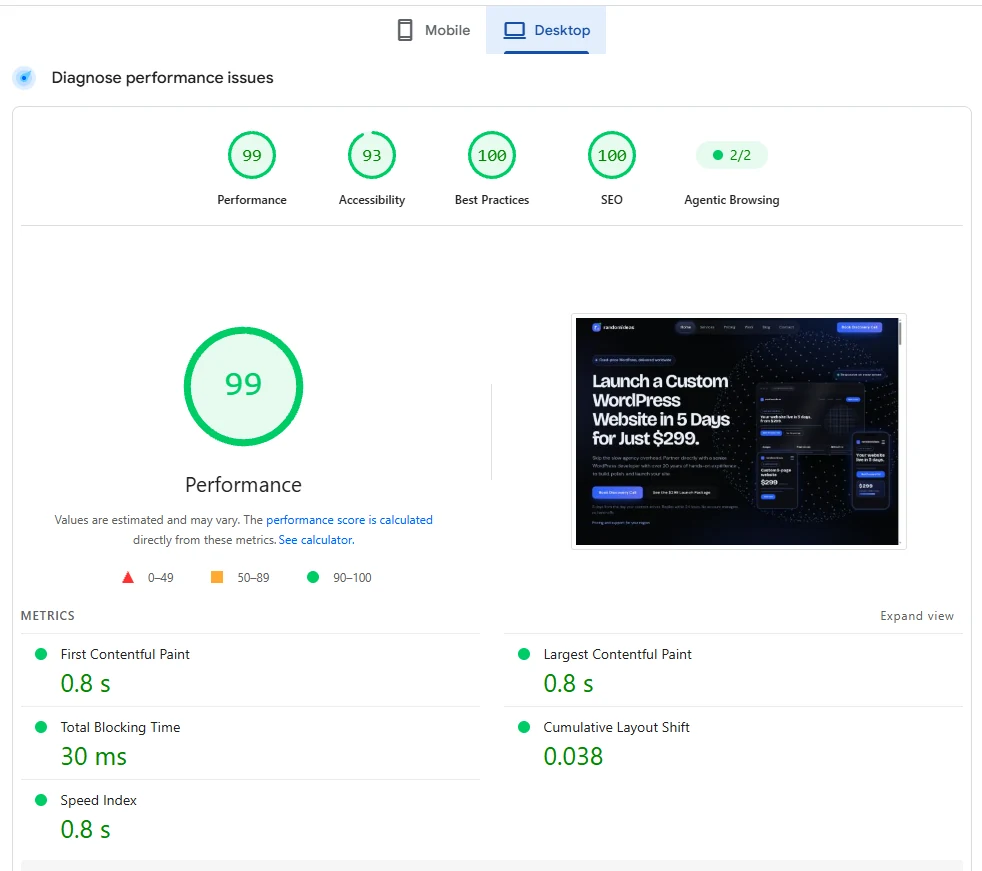
| Metric | Mobile | Desktop |
|---|---|---|
| Performance | 94 | 99 |
| Accessibility | 94 | 93 |
| Best Practices | 100 | 100 |
| SEO | 100 | 100 |
| First Contentful Paint | 1.7 s | 0.8 s |
| Largest Contentful Paint | 2.7 s | 0.8 s |
| Total Blocking Time | 130 ms | 30 ms |
| Cumulative Layout Shift | 0 | 0.038 |
| Speed Index | 2.6 s | 0.8 s |
On desktop the page paints in 0.8 seconds. On mobile there is no layout shift at all and only 130 ms of blocking time, which is why the content does not jump around while you scroll.
I will not pretend it is perfect. Mobile Largest Contentful Paint is 2.7 seconds, a little over Google’s 2.5 second target, and accessibility sits at 94 and 93 instead of 100. I am working on both. These are also lab results from a simulated device, so real visitors on real connections will see something different. Still, those are numbers I am happy to show a client.
Yes, a site with animation can still be fast
People assume motion and speed do not mix. They mix fine, as long as the motion is built with some care. Here is how the globe on this site stays light:
-
- It is drawn cheaply. The globe is one canvas element. No video, no animation library, no extra files to download.
-
- It scales to the device. Phones get fewer dots than desktops, and weaker devices get fewer still. Pixel density is capped so a sharp screen does not quadruple the work.
-
- It respects the visitor. If someone has reduced motion turned on, the animation stays still.
-
- No third-party scripts. Every outside script is another request and another chance for the page to stall.
-
- Cache and minify. The theme has a built-in page cache and minifies HTML, CSS and JavaScript, so most visits cost the server very little.
When a WordPress site is slow, the cause is almost always oversized images, plugins nobody uses and scripts nobody remembers adding. Motion is rarely the culprit.
What to ask your developer before you hire
-
- Can I see mobile and desktop PageSpeed results for a site you built?
-
- Which plugins will this site need, and why each one?
-
- How do you handle titles, schema and redirects?
-
- Can my team edit everything without calling you?
A good developer answers those without hesitation. If the answers get vague, keep looking.
WordPress is still the first pick for most marketers because search, content and tools all live in one place that you control. The speed excuse stopped holding up a while ago, provided the site is built properly. That is the kind of build I do: animated where it helps, quick where it counts, and easy for you to run.